

 Subscribe via email
  Become a fan
 Subscribe via RSS
 Follow me
What RSS is and how it will make your life so much easier
Written by Sam - 3 Comments »Despite the fact that RSS technology has been around for many years, most of my acquaintances still don’t know how to use it. If you spend a lot of time online, using RSS technology will simplify your life and save your tons of time.
Below if the first video in a series of videos I’ll be posting in the next day or two that describes in detail how RSS works and how to benefit from it. This first video goes through an example of how RSS works and the benefit you’ll receive by taking advantage of the technology.
What does this have to do with personal finances you ask? Well all these video tutorials will ultimately lead up to a video showing how to find the greatest deals imaginable online via RSS. In fact, you will literally be able to tell RSS exactly what items you’re looking for and you’ll receive an immediate update when that item goes on sale. You can also receive instant notifications when someone posts an item for sale on sites like craigslist. I’ve purchased many items and saved hundreds of dollars using this technique so you won’t want to miss it.
If you already use RSS, you may want to skip the initial videos. But who knows, maybe you’ll pick up some additional tips you didn’t know about.
This is the first attempt at at video on GFD so please leave your feedback in the comments below.
Technorati Tags: RSS, personal finances, how to, tutorial

Posted in How to, Technology, Videos | 3 Comments »
3 ways to avoid emotional spending during the holidays
Written by Sam - Comments Off on 3 ways to avoid emotional spending during the holidaysHoliday spending is on my mind right now. I’m trying to take measures to ensure our family spending stays under control and I know that the holidays are a very dangerous time for many financially. Too many people experience the debt hangover once the bills start coming in during January.
A couple years ago I wrote about 10 ways to save money this Christmas. I even added a bonus 11th way to save money. In fact, during the next week (before Black Friday hits) I’m going to be expanding upon tips #3 and #4 with video tutorials on how to supercharge your deal-hunting expertise. I’ll show you how to use the internet to find unbelievable savings. So stay tuned for that.
But I digress. One of the reasons people overspend is because of emotional spending. The sights, sounds, and smells of Christmas can induce people into a spending frenzy. Here are a few ways to avoid emotional spending this holiday season.
1. Order your gifts online
Ordering gifts online is a great way not only to save money and avoid overspending, but it’s also really fast and easy. By avoiding the stores as much as possible, you’ll be able to avoid the marketing stimulation that exists in malls and retail stores that lures you to buy more and more. You can much more objectively create your list and buy ONLY what you intend to buy and no more. Plus, you can typically find items at lower prices on the internet which can create significant savings.
When to order gifts online to make sure you get them by Christmas
I recently came across a page on Deal Hack that has a comprehensive list of online retailers and when you need to order from them to get your gifts delivered in time for Christmas. View the list here.
Sites where you can find great deals
A while back I posted a couple of articles explaining how to find deals and shop using RSS technology. Doing so allows you to be notified when the exact item you want goes on sale. I also posted a list of sites that allow you to use RSS for your shopping. These same sites also happen to be some of my favorites for finding great deals. Some of the links in the list may be outdated. I’ll try to make sure the list is updated.
2. Buy what you want and then return the items that are over your budget
One approach my wife and I have taken when buying gifts during the holidays is to not worry too much about how we’re spending. If we happen to see an impulse item and it’s a great deal, we go ahead and buy it. Then, before we wrap all the gifts we review which ones are inside our budget and which ones we want the most. Then we return the rest.
This has worked particularly well when shopping for our son. It is somewhat liberating be able to take advantage of great deals or impulse shop even if you know you’ll be returning items. It also allows you to shop more efficiently because you don’t have to return to the store later if you decide to purchase an item while running the risk they’ll be sold out.
Once you’re considering all the gifts together and deciding which to return, the choice is much easier because you’re making comparisons rather than looking at each gift individually. For example, I might really think my son will love the card game when I see it in the store, but comparing against the transformer that he’s dying to have, the choice of which to return is much easier.
I will admit that this requires some work to return the gifts. I recommend trying to return them before Christmas is over because the post-Christmas lines can be a nightmare for a week or more after Christmas.
3. Get your shopping done before Black Friday
I recommended in my last post to get your shopping done before Black Friday. The pre-Thanksgiving shopping environment is a little less emotionally charged. The holiday promotions aren’t quite into full swing and the crowds are lighter. It’s easier to buy what you intend and it’s a more pleasant, less hectic experience. One Thanksgiving is over hold on to your seat and prepare for a crazy ride.
Posted in Shopping | Comments Off on 3 ways to avoid emotional spending during the holidays
The secret to saving money on holiday shopping: do it early!
Written by Sam - Comments Off on The secret to saving money on holiday shopping: do it early!I’m a shopper. I love shopping, particularly during the holidays. There’s something about the sights and sounds and smells of the holidays. And, yes, I’m a male. The fact is I’m the shopper and my wife hates shopping. The sights, sounds, and smells of the holiday create for her a sensory overload and usually lead to a headache. So I end up doing most of the holiday shopping alone or with my mom, who is also a big holiday shopper.
The fact is, it’s somewhat of a blessing to have an aversion to holiday shopping like my wife. You save money. The holiday spirit for me is a recipe to spend money. You get caught up in the moment and lose track of reality a little bit…sometimes a lot. It’s just so easy to buy one more thing; easy to lose track of what has been spent on whom; easy to forget about your budget with an attitude of “it’s ok, it’s Christmas after all” or “it’s such a great deal how can I pass it up?”
So what am I suggesting, that you DON’T SHOP during the holidays? That’s blasphemy! Well, that’s exactly what I’m suggesting. Instead of doing your shopping after Thanksgiving, get your holiday shopping done BEFORE the holidays.
Now, I realize this advice may come a little too late. For many, the holidays being after Halloween. Certainly retailers want to extend the holiday shopping season so it starts a soon as possible. The sooner you enter that alternate reality the better from their perspective. However, while the holiday shopping season has kind of already begun, it doesn’t go into full swing until Black Friday. There’s time left! One week left!
Why is shopping before the holidays effective?
If you’re serious about spending within your holiday budget this year GET YOUR SHOPPING DONE NOW! By doing your shopping before Black Friday you’ll be able to keep a rational frame of mind. Here are some ways getting your shopping done early will save you money:
You avoid emotional buying
How many of you make a clear list of what to buy your loved ones within your budget and then go out and buy those things and only those things? This rarely happens because, despite good intentions, you inevitably come across an item that just cries out to you “so-and-so would love this” or “that’s such a great deal I’ll buy it for so-and-so.” This emotional buying will happen much less before the holidays hit full swing. I don’t know what it is, but when my wife and I have done much of our shopping before the holidays it just feels so much more stable. We buy what we intend to buy and nothing more.
You avoid the notion of the ultimate deal
The idea of the ultimate deal is really an illusion. People justify spending over their budget just because they are getting a great deal. Sure, there are some incredible deals during the holidays and if you’ve been waiting to buy a certain gadget or gift and have the budget for it, go ahead and take advantage of these deals. However, be careful to differentiate between those items that you really want and those items that you think you want because it’s such a great deal.
You avoid purchases due to competition or scarcity
Retailers love to create a sense of scarcity. Take the Wii for example. It seems like the Wii was hard to find in stores for 2 years. You can’t tell me that Nintendo couldn’t ramp up production to meet demand. Nintendo instead purposefully released only a certain amount of Wiis at a time so that there was scarcity. This was an effective ploy because people would snatch up Wiis without even thinking.
Retail promotions work the same way creating a sense of urgency. There’s a sense that you NEED to purchase right now. If you don’t, someone else might and you’ll lose your chance.
Getting your shopping done early largely removes this sense of competition and scarcity. You can more easily make rational decisions based on what gifts people truly want in spite of sales and promotions.
But what if I feel like shopping is a part of my holiday tradtion?
For many people shopping probably DOES feel like a holiday tradition. How can the holidays be the same without that last minute shopping on Christmas Eve? One way to solve this problem is to create new traditions. Instead of going on a last-minute splurge, try taking the family ice skating. Go to a holiday movie. See what local musical performances are happening.
If you still feel you can’t stay away from the stores, go ahead and go with a friend or family member but leave your wallet or purse at home. For some people you can get 95% of the excitement and holiday spirit just by being in the festive shopping atmosphere. You can vicariously experience the fun of shopping when your friend makes a purchase. A large part of the fun of holiday shopping is simply social anyway. It’s about being with friends and family, having a bite to eat or a cup of hot chocolate for a break. You can experience these without spending money on more “stuff.”
Why I avoid Black Friday like the plague
I few years back I wrote about my experience participating in the Black Friday hoopla. To make a long story short I spent a miserable morning at around 3:15AM standing in the freezing cold in a line that wrapped all the way around Best Buy only to find that the item I wanted was gone by the time I got in the store.
Black Friday is just not worth it. Most of the really incredible deals are there to obviously get people into the store. What they don’t mention in the ads is that they will often have a very small supply of the super-deal items in stock so they sell out almost instantly. Do yourself a favor and sleep in.
You have one week left before the craziness begins
If you’re able to get your shopping done in the next week, do it! If not, I wish you the best and hope you fare well during the holiday craziness. It’s the rare person who can survive the emotional thrill-ride that is holiday shopping. Hopefully you’re like my wife and it gives you a headache. If not, we’ll see you on the other side.
Posted in Shopping | Comments Off on The secret to saving money on holiday shopping: do it early!
Earn additional income: Do something every week
Written by Sam - 2 Comments »Many people have the dream of becoming financially independent; starting their own business; being able to quit their job. Over the last several years we’ve seen a proliferation of literature focused on obtaining your goals and desires and manifesting the type of life you want. However, it can be a very daunting task to figure out where to start. When I lay out all my goals, I’m overwhelmed. The list is so large that it starts to give me anxiety. Then I feel overloaded and end up just not doing anything at all towards their achievement.
Well, a few years back I had a break through.
My Story
I decided after many false starts that I was going to set aside one night a week for the sole purpose of achieving my goals. I didn’t even know which goals I was going to pursue at the time, but I knew that I needed to start taking some sort of action.
I decided to start with one online business idea I’d had for a while – an online hour-tracking service for small businesses to keep track of hourly employees. Since I had a lot of professional online product development experience, this came pretty easily. I created wire-frame charts of how the site would flow and what functionality it would include. I spent about 2 weeks, or two of my nights, working on the idea.
Then, one night while on a walk I was hit by inspiration to create Getting Finances Done. I had a flood of ideas and once I got back from my walk I filled up several full sheets of paper on ideas for the site, topics I would write about, and experiences from my own life. My wife got in on the discussion and added even more ideas.
I put aside the first project and started working on creating GFD (at the time I didn’t have a name for the site).
It took several weeks (about 4-5 if I’m remembering correctly) to get the site up and running to a point I was satisfied with. It was actually a challenge to launch the site because I kept wanting to make things perfect. I finally realized I was just delaying and asked myself “what do I consider the bare-minimum requirements to launch the site?” I made a list that night and committed that when those things were accomplished, I would launch. Just as a side note, I had to do the same thing with the re-launch of GFD a few days ago. There are still several things I need to add or fix, but I reached my “good enough” criteria, so I launched.
Well, I launched and started writing. I wrote for several weeks. Nothing happened. I would look at my site traffic and couldn’t tell if I was actually getting visitors or if the hits were just from me.
Then one day I looked at my stats and saw a huge spike in traffic to my site. My heart stopped beating and I got a huge rush of adrenaline. I had been featured by LifeHacker, one of the largest blogs around. I looked in my AdSense account and had made $5.00 that day. I started jumping around and was sooooo excited. In fact, I don’t know if anyone’s been more excited about $5.00 in their life than I was at that time. I knew at that moment a couple of things: one, that my writing provided enough value for people to be interested in it, and two, that I could actually make money from doing this website stuff. I knew that if I could get one article featured, I could get more; if I could make $5.00 I could make $50 or $500, or more.
After that, things picked up for GFD. My articles were regularly picked up by other sites and I’d see regular spikes in traffic and in readership. Within a year I’d been featured on Yahoo!, Dow Jones MarketWatch, the Washington Post, About.com, and many other sites. I just kept putting in my weekly night. Sometimes that would extend over into other days and sometimes I’d come home from working 8 hours at my full-time job just to spend another 8 hours or more working on my side business. I only posted once a week, because that’s all I could do, but it seemed to be working just fine.
I had successfully built a side-business working on it just one week a night. Now, there’s much more to the story, but that’s for another post. The point for now is that I took action and made something happen.
So, what are some of the lessons I learned in this process?
The Fluidity of Action
The first lesson I learned is that good things happen when you take action. It doesn’t even have to be the right action. Bodies in motion tend to be easier to direct than bodies at rest. This applies in the physical world as well as in our lives.
Take a card for example. Have you ever been in a car without power steering and tried to move the sterring wheel while the car is at rest? It’s very difficult to move it very much. But as soon as the car starts moving, it becomes almost effortless to move the steering wheel.
This example is a perfect analogy for our lives. When we are standing still, it’s hard to direct our lives. It seems almost impossible to change direction. But when we start moving, it becomes much easier to steer our lives. We may start out going in the wrong direction, but that’s ok because it’s easier to make corrections and to steer in a different direction.
In my case, I started out working on a project and soon realized that there was an even better, more fulfilling project waiting for me. Since I was already in the mode of taking action, I quickly adjusted and was off and running on the new project.
Focus On Completion
When I decided to set aside an evening a week to work on my goals, I didn’t think I would be able to accomplish much but I knew it was better than nothing. I was surprised at how much I could accomplish in one evening. Of course, I had to be very focused and tried to be very goal-oriented.
Each night when I started working, I would look at a list of all the things I wanted to accomplish with the site and asked myself two questions: 1) what is most important to get done, and 2) what items could I accomplish 100% tonight. I would then narrow down the list and work on the items that were both important and that I could fully complete that night. With that type of results-oriented focus I was able to make very quick progress. I learned that it was much better to do ONE thing to completion than to work on SEVERAL things and end the evening with many loose ends.
Consistency Works
One of the reasons I was successful starting my site is because I was consistent. Rather than attempting to do everything in one week, I spread it out over several. While this caused me to move a little slower than I might have otherwise, it helped me to not burn out. I just kept chipping away and making steady progress.
Don’t give up hope
I wrote for many weeks before getting any substantial traffic. In that time I could have gotten down and depressed and given up, but I kept going. Doing so had some positive side effects. One side effect is that I improved my writing skills. Another was that as I wrote, I would think of more things to write about. Yet another, and maybe the most important, was that by the time I got featured I had a site with some substance. Visitors weren’t just greeted with one or two articles, but many. This made visitors more sticky and likely to come back and visit again. Thank goodness I didn’t just give up.
If you can make $1, you can make $10 or $100. If you can make $100, you can make $1,000. Etc, etc, etc.
One thing that was clear to me when I made the $5 is that it represented way more than just the monetary value; it represented the possibility of additional income streams. I knew that the hardest part was making your first dollar. Each dollar after that gets easier because you already have a product. You already have at least somewhat of a user base. You’ve done the work it takes to provide some sort of value. That’s not to say that your work is over, but by the time you make your first dollar, you’re already in a mode of action. It’s much easier to provide more value, tweak your approach, or try something new.
Don’t Be a Perfectionist – Use The “Good Enough” Philosophy
I have pretty strong perfectionist traits, but they haven’t served me very well in my life. Mostly they’ve just kept me from doing things because I know how much work it will be to get it perfect. Maybe this comes from my previous life as a pianist and bassist. What has become clear to me in the business world is that things don’t need to be perfect. If they are, you’re usually spending too much money and taking too much time in developing your offering.
That’s not to say you should strive for excellence or have standards. However it IS saying that your actions don’t always have to be perfect. Take my site for example. I re-launched on Monday and yet there are many things on the site that aren’t the way I want them yet; I want to improve the navigation even more; I want to tweak some of the look-and-feel characteristics; etc, etc. However, before launching I made a list of things that I considered to be requirements for launching. What can I live with without violating my conscience or being embarrassed? This process also helped me identify what things were nice to have but not necessary. I added those items to a list of future tweaks and additions. Once I had finished make these lists I was much more motivated to act and get the site launched because I had defined and clarified in my own mind what specifically was required.
Do Something – Anything – Once a Week
The real bottom line for me and what I’d recommend to others is that if you want to start a business, earn additional income, or reach your goals in general, commit to setting aside time each week to take action. Then be attentive to your intuition and don’t be afraid to adjust. Remember, if you’re moving, it’s much easier to steer your life. As you’re successful you can then adjust and spend more time if you want; you’ll have more options in general.
Posted in Makeing Money, Motivation | 2 Comments »
How Your Credit Score Is Calculated
Written by Sam - Comments Off on How Your Credit Score Is CalculatedThere’s been a lot of talk in the news lately about credit card companies making changes, such as lowering credit lines and cancelling unused cards, that can lower credit scores even for responsible borrowers. In a recent post How to save your credit score I complained that credit scores seem to be such a mystical thing. I almost always hear broad generalities about how to improve your score, but rarely hear specifics.
Today that changed.
An article from CNNMoney.com (via Yahoo!) helped to clear up some of the confusion. The article actually breaks down how a credit score is calculated. Here’s a graph from the article:
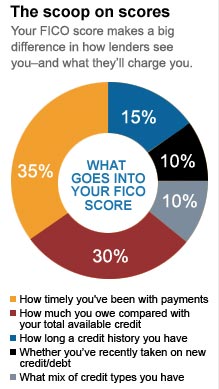
It wasn’t clear to me if this graph covers ALL the factors in calculating a credit score, but it probably represents the most important factors. One clarification CNNMoney makes is that you should keep your debt utilization ratio under 10% if possible. It should never go higher than 20%.
I encourage you to read the whole article, but here is a summary of the most important factors in how your credit score is calculated and what you should do to keep your score healthy.
- Don’t make late payments (specifically over 30 days late).
- Keep your debt utilization ratio at ideally under 10% and certainly no more than 20%. This applies to any given credit account as well as looking at your debt for all accounts.
- Try to occaisionally use older credit cards so they don’t close the account on you. Older credit carries a greater positive weight in calculating your score.
- Opening new credit accounts tends to lower your score. Still no specifics on how much it lowers your score.
- The type of credit account you open has an affect on your score. While the CNNMoney article didn’t mention specifics, we know from my previous post that you should try to avoid opening accounts for retail and gas credit cards.
The article also listed a couple of resources that I haven’t had a chance to thoroughly check out, but that look useful.
Card Ratings.com
CreditKarma.com
Posted in Credit Cards, Credit Ratings, Credit Score | Comments Off on How Your Credit Score Is Calculated